

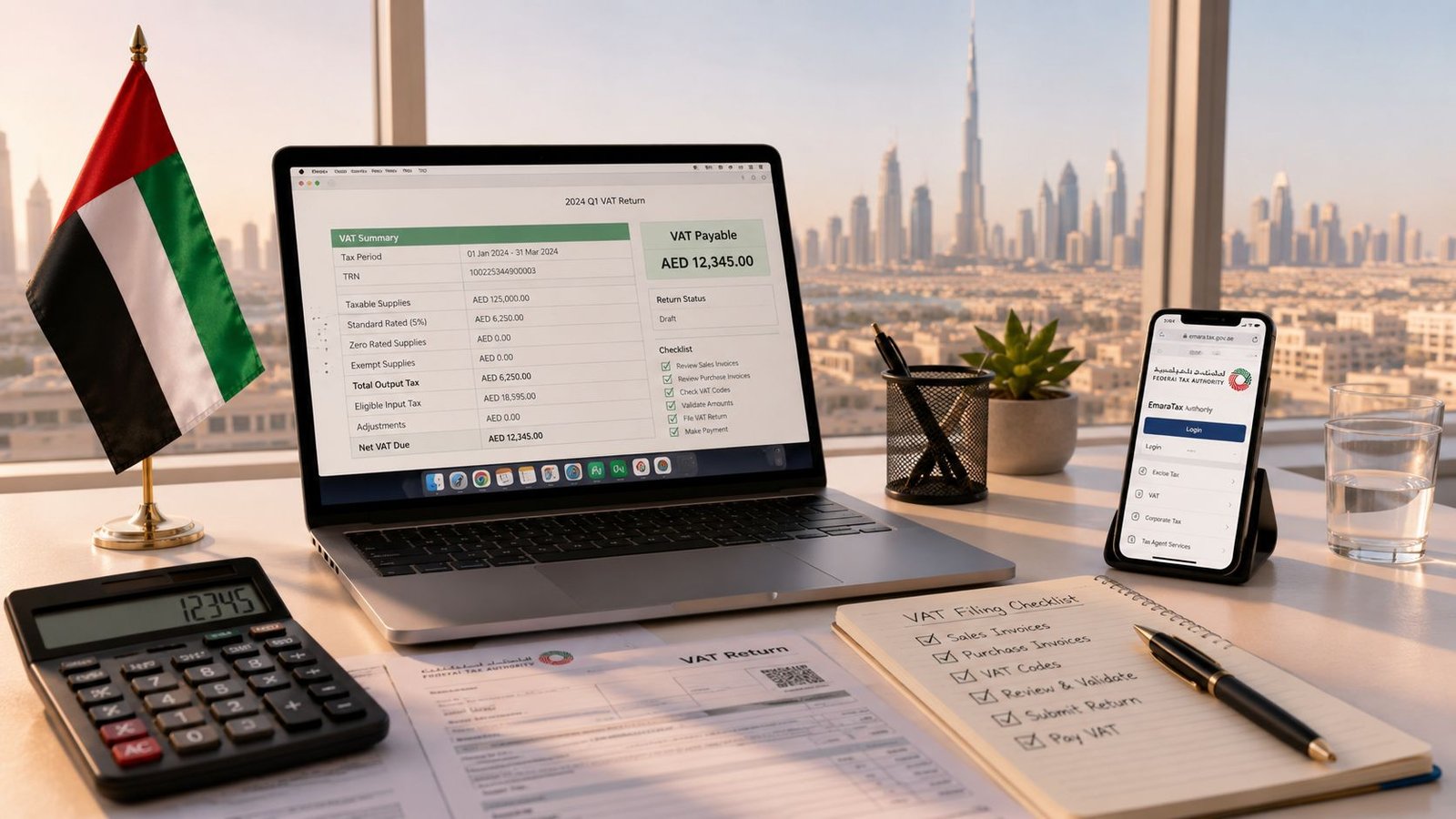
You've opened EmaraTax, your sales ledger is not fully reconciled, and the filing deadline is approaching. To file a VAT return in the UAE, complete the electronic VAT-201 through EmaraTax, submit it within 28 days after the end of the assigned tax period, and pay any VAT due on the same timetable. Work happens before you click submit, because the Federal Tax Authority, or FTA, expects the return to agree with your invoices, ledgers, customs records, and payment evidence.
Table of Contents
- What a UAE VAT Return Is and When It Is Due
- Registration and Records You Need Before Filing
- Calculating VAT and Reading the VAT-201 Form
- Filing the VAT-201 on EmaraTax Step by Step
- Common Errors That Trigger FTA Scrutiny
- Amending a Filed Return and Voluntary Disclosures
- Deadlines, Penalties, and Your Filing Checklist
What a UAE VAT Return Is and When It Is Due
A VAT return is a tax declaration that reports a registered business's taxable sales, zero-rated supplies, exempt supplies, imports, output VAT, recoverable input VAT, and resulting balance for a tax period. The UAE form is called VAT-201, and every VAT-registered person must use it for the period assigned by the FTA.
The deadline is mechanical. The FTA user guide says the return must be received no later than the 28th day following the end of the tax period. The FTA VAT returns user guide supports this fixed filing rule.
For example, if your tax period covers January to March 2026, the filing and payment cut-off is 28 April 2026. Your own tax period might be monthly or quarterly, so check the registration records shown in EmaraTax rather than assuming every UAE business follows the same cycle.
What does the 28-day rule cover?
It covers both submission and payment. If the return shows VAT payable, settle that amount within the same deadline window. Ordinary cash-flow pressure doesn't extend the deadline, and a return showing no VAT payable still has to be submitted. The official UAE government VAT filing guidance confirms that filing is mandatory even when there were no taxable transactions in the period.
Use the rest of this process as a working routine. Close the accounting period, classify transactions, reconcile the VAT figures, complete the VAT-201 in EmaraTax, save the evidence, and pay before the cut-off.
Practical rule: Treat the 28th day as the final safety point, not the day you begin preparing the return.
Registration and Records You Need Before Filing
A founder can open EmaraTax with the correct TRN and still file an unreliable return. Before entering a single VAT-201 figure, confirm that the business registration matches its activity and that every reported amount can be traced to an invoice, ledger, or customs record.
VAT registration is the process through which a business obtains a Tax Registration Number, or TRN, from the FTA. Mandatory registration applies when taxable supplies and imports reach AED 375,000, as stated in the FTA VAT registration guidance. That threshold determines when VAT filing obligations begin. Foreign businesses may be subject to different registration considerations, so apply the rule to the entity's actual facts.
Check voluntary registration and application timing against the current EmaraTax process before relying on a general online table. The FTA's treatment of your entity takes priority over a copied threshold summary.
What records should be ready?
Build a filing pack that explains how each VAT-201 figure was calculated:
- Sales evidence: Tax invoices, credit notes, debit notes, export documents, and customer records.
- Purchase evidence: Supplier tax invoices, purchase credit notes, expense records, and fixed-asset invoices.
- Import evidence: Customs declarations, import VAT statements, and records for goods brought into the United Arab Emirates.
- Reverse-charge evidence: Supplier invoices, contracts, payment records, and calculations for imported services or goods.
- Accounting evidence: Trial balance, sales ledger, purchase ledger, bank reconciliation, and VAT control accounts.
- Filing evidence: The previous VAT-201, EmaraTax acknowledgement, and payment confirmation.
The FTA VAT records and accounts guidance supports retaining core VAT records for the period required by UAE rules, including invoices, customs documents, import records, reverse-charge records, and import VAT statements. Real estate records may carry an additional retention requirement. Organise the files so you can produce them promptly if the FTA requests them, including in Arabic where requested.
What should you collect before opening EmaraTax?
Prepare the TRN certificate, previous VAT-201, quarter trial balance, and general ledger VAT accounts. Close the accounting period first. Then confirm that foreign-currency transactions use the applicable conversion method and that all credit notes have been posted.
| Item | Detail | Threshold / Source |
|---|---|---|
| Mandatory VAT registration | Registration is required once taxable supplies and imports reach the mandatory level | AED 375,000, FTA registration guidance |
| Tax Registration Number | The TRN identifies the taxable person in FTA records | Confirm on the VAT registration certificate |
| VAT-201 | The electronic return used to report VAT for the assigned period | Submitted through EmaraTax |
| Filing records | Sales, purchases, imports, reverse-charge evidence, ledgers, and prior returns | Retain under UAE record-keeping requirements |
| Pre-filing pack | TRN certificate, previous VAT-201, trial balance, and VAT general ledger accounts | Prepare before portal entry |
Do not start portal entry until this pack reconciles. It gives you an audit trail that supports the filing mechanics and remains usable if the FTA reviews the return later.
Calculating VAT and Reading the VAT-201 Form
Don't begin with the EmaraTax boxes. Begin with the trial balance and map each transaction to the correct VAT treatment.
Standard-rated supplies are taxable supplies charged at 5%. They include ordinary local sales where no special treatment applies. Zero-rated supplies are taxable supplies charged at 0%, such as qualifying exports and other supplies that meet UAE zero-rating conditions. Exempt supplies are outside the VAT charge, although they still need to be reported where the VAT-201 requests them.
The return separates the value of supplies from the VAT amount. A clean working paper should show the taxable base, the applicable treatment, the VAT amount, and the source ledger entry.
How do the main classifications reach the return?
Use the VAT-201 structure carefully:
- Box 1: Standard-rated supplies and the related output VAT by emirate.
- Box 2: Zero-rated supplies, supported by evidence such as export documentation where relevant.
- Box 3: Exempt supplies, including qualifying financial services or bare land treatment where applicable.
- Box 5: Standard-rated expenses and purchases.
- Box 6: Output VAT on standard-rated supplies.
- Box 7: Recoverable input VAT on eligible expenses.
- Box 8: Net adjustments for the relevant return, not a way to conceal an earlier-period error.
- Box 9: The resulting net amount where the return calculation produces a refund position.
Reverse-charge transactions need separate attention. For an imported service or other reverse-charge purchase, the buyer accounts for the output VAT and may claim eligible input VAT, subject to the normal recovery rules. The working should show the gross imported value and the corresponding VAT, rather than netting the input against the output.
What does a worked calculation look like?
Assume a Dubai trading business has AED 1,000,000 in standard-rated local sales, AED 400,000 in zero-rated exports, AED 100,000 in exempt supplies, and AED 250,000 of recoverable input VAT on purchases. The standard-rated sales create AED 50,000 of output VAT, calculated at 5%. The input VAT exceeds that output VAT, creating a refund position of AED 200,000 in the simplified example.
| VAT-201 Box | Line Item | Amount (AED) | Calculation |
|---|---|---|---|
| Box 1 | Standard-rated local sales | 1,000,000 | Taxable sales value |
| Box 2 | Zero-rated exports | 400,000 | Qualifying exports at 0% |
| Box 3 | Exempt supplies | 100,000 | Reported exempt value |
| Box 6 | Output VAT | 50,000 | 1,000,000 × 5% |
| Box 7 | Recoverable input VAT | 250,000 | Eligible purchase VAT |
| Box 9 | Refund position | 200,000 | 250,000 − 50,000 |
This is a teaching example, not a reason to claim every input invoice. Review eligibility, invoice support, imports, mixed-use costs, and any restricted expense before transferring the figure.
Filing the VAT-201 on EmaraTax Step by Step
Log in to EmaraTax using the registered UAE Pass or EmaraTax credentials. Select the correct taxable person from the dashboard, then open the VAT-201 tile for the active tax period.

What should you check before entering figures?
First, compare the displayed tax period with the dates on the FTA registration certificate and your accounting close. Period mismatch is one of the easiest ways to submit an apparently complete return for the wrong cycle.
Then work through the return in order:
- Confirm taxpayer details. Check the entity name, TRN, contact details, and authorised signatory.
- Enter standard-rated supplies. Report the relevant sales values by emirate in Box 1 and verify the output VAT.
- Report zero-rated and exempt supplies. Enter qualifying zero-rated amounts in Box 2 and exempt amounts in Box 3. Keep the evidence that supports each classification.
- Record imports and reverse-charge items. Reconcile customs records and imported services to the relevant output and input sections. Don't enter only the net result.
- Enter recoverable input VAT. Use Box 7 for eligible VAT supported by valid tax invoices and accounting entries.
- Review the calculation. Compare the return result with the VAT control account and trial balance. The final payable or refundable result should agree with the amount shown in the relevant net calculation, including Box 14 where displayed for the return workflow.
The FTA filing method is electronic, and the UAE government EmaraTax filing instructions confirm that VAT returns are submitted online. Upload the requested VAT-201 PDF, workings sheet, and any FTA appendices or supporting schedules. A portal submission without a coherent working file leaves you exposed when someone later asks how the figures were calculated.
After submission, pay the liability through an available approved channel, such as eDirham, bank transfer, or an FTA-approved payment gateway. Download the acknowledgement and keep the bank confirmation slip with the return pack.
This video can help you recognise the portal flow before you start, but your accounting reconciliation remains your responsibility.
Common Errors That Trigger FTA Scrutiny
A VAT return is only one part of the compliance file. The FTA can compare it with accounting records, tax invoices, customs data, earlier VAT-201 filings, and information obtained through compliance activity. The practical lesson is clear: submit figures that a reviewer can trace, not figures copied from a spreadsheet without support. A filing pack that connects each material amount to its source is far more useful during an inspection than a rushed portal submission. This approach also prepares the business for the increased enforcement activity expected in 2026, without relying on unsupported inspection statistics.
Which errors appear most often?
Period mismatch often follows a registration change, voluntary registration, deregistration process, or misunderstanding of the assigned tax cycle. Check the EmaraTax period against the VAT certificate and previous VAT-201 before importing figures from the accounting system.
Reverse-charge errors arise when a business records only the net cost or claims input VAT without declaring the related output VAT. Reconcile imported services and goods to the purchase ledger each month, then include the relevant value in the return workings and related boxes.
Input VAT misclaims usually reflect weak invoice support, entertainment costs, business gifts that do not qualify for recovery, or mixed-use assets. Separate recoverable and non-recoverable amounts before entering Box 7. Record the business purpose and apportionment where required.
Duplicate invoices can enter two consecutive periods after a late supplier posting. Compare the current purchase ledger with the previous VAT-201, and mark every invoice already claimed before approving the return.
Bad-debt relief requires a separate review when a customer has been deregistered. Difficult collection alone does not justify reducing output VAT. Check the customer status, eligibility conditions, accounting treatment, and supporting correspondence.
| Error Type | Typical Source | Practical Fix |
|---|---|---|
| Period mismatch | Incorrect tax cycle after registration changes | Match EmaraTax dates to the FTA certificate and prior return |
| Reverse-charge omission | Imported service recorded as an ordinary expense | Reconcile Box 6 and related input lines to the purchase ledger |
| Input VAT overclaim | Unsupported invoice, restricted expense, or mixed-use asset | Store valid tax invoices and remove non-recoverable amounts |
| Duplicate purchase claim | Same invoice posted across two periods | Run a duplicate invoice check against the prior VAT-201 |
| Import mismatch | Customs and bookkeeping records disagree | Reconcile customs declarations, import statements, and ledgers |
| Bad-debt error | Customer status or relief conditions not checked | Review deregistration evidence and the relief calculation before filing |
Before submission, test every material VAT figure. It should have a ledger trail, an invoice or customs record, and an explanation another person can follow. Keep the working file with the VAT-201 and supporting evidence. That file is what turns portal mechanics into a defensible filing record, consistent with the FTA's VAT compliance information.
Amending a Filed Return and Voluntary Disclosures
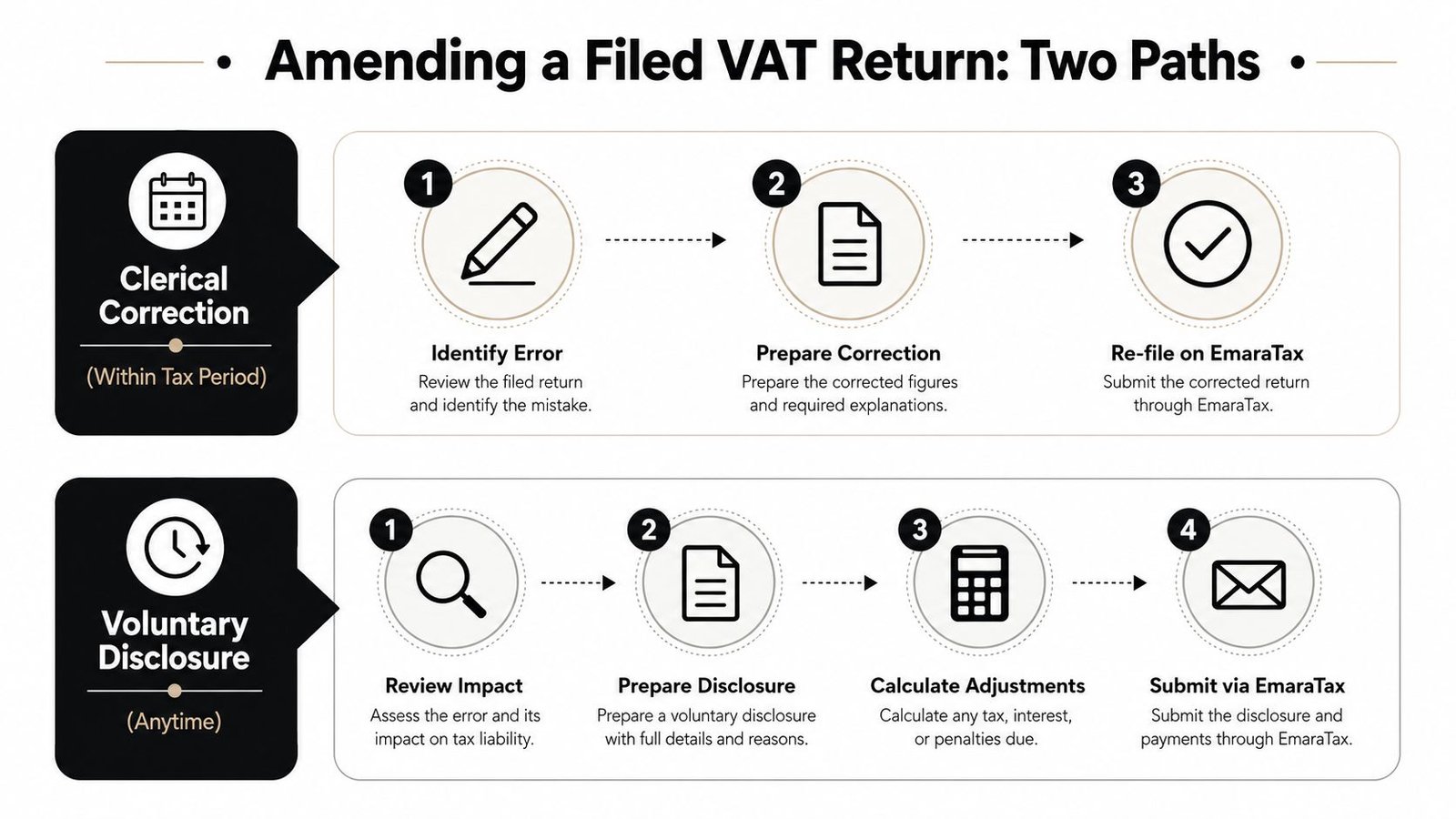
Submitting the VAT-201 does not close the control process. If your review finds an error, decide whether EmaraTax still allows a correction in the open return or whether you must file a voluntary disclosure, a separate notification to the FTA about an error affecting a filed return.
Use the open return for a permitted clerical correction. Once the period is closed, do not alter the next return to conceal an earlier mistake. Open the voluntary disclosure function in EmaraTax, identify the original VAT-201, explain the error, and attach a revised schedule supported by a clear workings sheet.
How should you prepare a voluntary disclosure?
Build one concise internal file containing:
- The original position: What you submitted and when.
- The error: The transaction, VAT-201 box, tax period, or classification affected.
- The corrected position: The revised taxable value and VAT amount.
- The cause: An omitted posting, duplicate claim, reverse-charge issue, or classification mistake.
- The impact: Whether VAT is underpaid, overpaid, or unchanged.
- The evidence: Invoices, customs records, contracts, ledgers, and approval notes.
UAE tax law provides an amendment window of five years, as explained in the FTA guidance on voluntary disclosures and correcting errors. The treatment differs depending on whether you file late or the FTA discovers the error. The FTA penalty guidance identifies a AED 3,000 fixed penalty for a late voluntary disclosure and AED 5,000 for an unreported error discovered by the FTA, so check the facts and timing before submitting.
If the correction results in underpaid VAT, the FTA penalty guidance identifies a 2% monthly late-payment surcharge on the outstanding amount. An overpayment requires a separate review of whether the amount should be refunded or carried forward, including the relevant Box 12 treatment in the filing process.
File the disclosure as soon as your review confirms a material mistake. Preserve the supporting records and a signed internal explanation. That filing pack gives you a defensible record if the FTA later tests the return.
Deadlines, Penalties, and Your Filing Checklist
A late VAT return creates exposure even when the return shows no VAT payable. Keep submission and payment as separate tasks in your compliance calendar. The FTA filing guidance supports the applicable filing cycle, and the UAE late VAT filing penalty guide explains the fixed penalties for late filing. Do not treat a nil return as optional.
What should you do every tax period?
Use a documented close process. It gives you evidence for an FTA review, rather than only proof that someone clicked submit.
- Verify the TRN and period. Confirm the entity, tax period, and filing status in EmaraTax.
- Close sales and purchases. Post invoices, credit notes, debit notes, imports, and reverse-charge transactions before extracting figures.
- Reconcile the VAT accounts. Match the VAT control accounts to the VAT-201 boxes. Investigate unexplained differences before filing.
- Review unusual movements. Compare the draft return with the previous period. Check large changes in zero-rated sales, exempt income, imports, input VAT, and adjustments.
- Check free-zone treatment. Confirm that supplies classified as connected with a designated zone meet the relevant conditions. Do not assume that a free-zone licence makes every transaction outside the normal VAT rules.
- Build the filing pack. Save the VAT-201 PDF, workings, invoices, customs records, schedules, reconciliation, and approval evidence.
- Submit and pay. Save the EmaraTax acknowledgement and payment confirmation in the same folder.
File first, then preserve the record. A return without its workings leaves your team rebuilding the evidence under pressure during an FTA inspection.
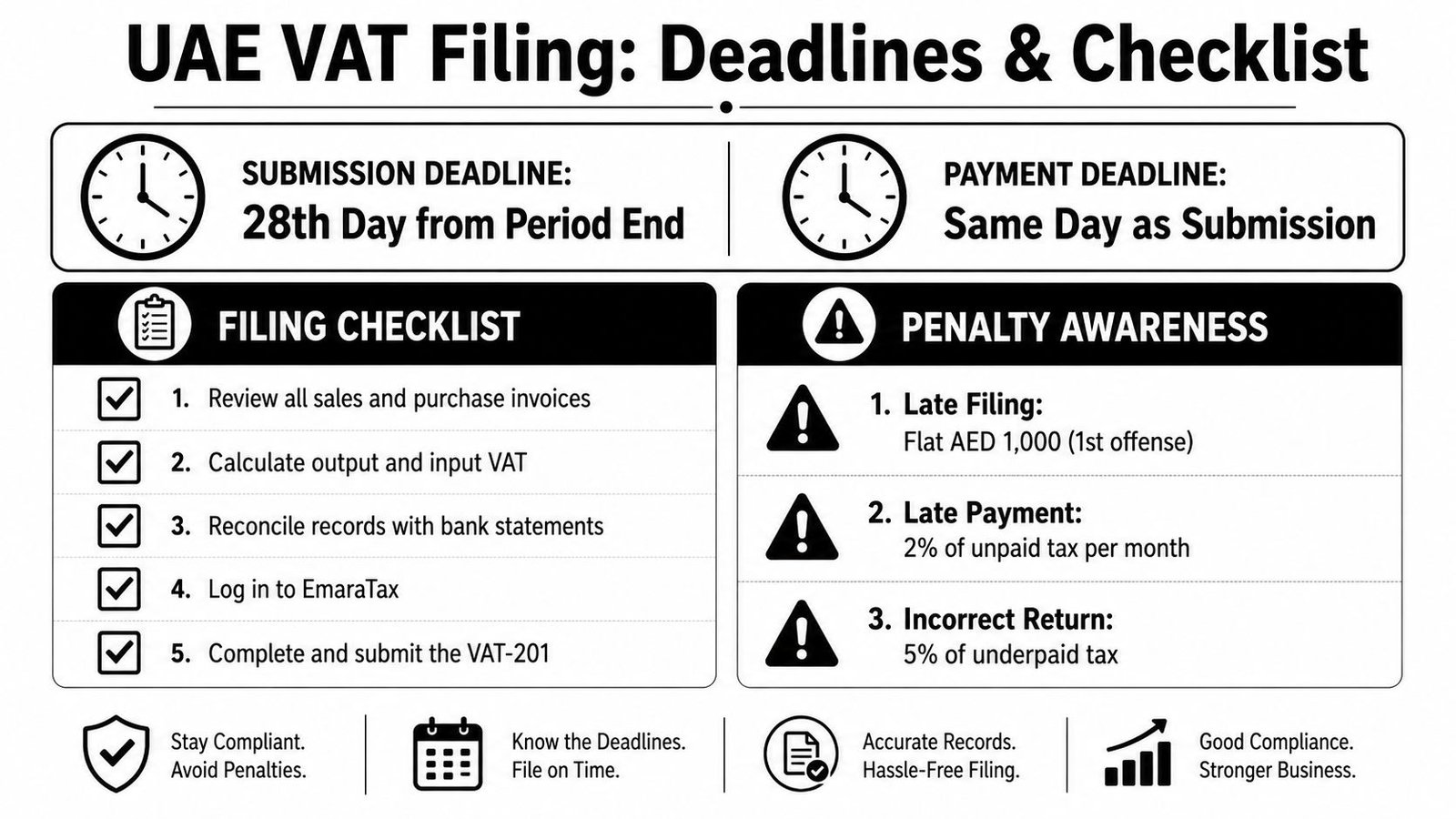
The late-payment position depends on the amount, timing, and applicable penalty rules. Submitting the VAT-201 does not remove payment exposure. If your review identifies an error, assess the correction promptly and retain the analysis, approval, and supporting records. That filing pack is what helps a Dubai, Abu Dhabi, Sharjah, or free-zone business answer FTA questions clearly.
Inpro Corporate Services L.L.C. can help with UAE VAT registration, VAT-201 preparation, EmaraTax filing, reconciliations, and ongoing compliance for mainland and free-zone businesses. Visit Inpro Corporate Services L.L.C. for support with your next filing and records prepared for FTA review.